Alchemy 8.4
The end of an era
With this release we finalize the removal of jQuery, rails-ujs and Select2 from the admin interface.
It’s the end of a journey that began years ago, back in the 7.x series. Since then we have rebuilt the admin piece by piece on web components, ES modules, Turbo and native browser features.
This release also ships a broad round of security hardening, finer caching control and many small improvements. Some of them are highlighted below.
A Admin Frontend built for the Web to stay
This has been a long road.
With 7.1 we started rebuilding the admin’s interactive parts as web components, beginning with the datepicker, TinyMCE and the file upload. 7.4 said goodbye to CoffeeScript in favor of ES modules and introduced Turbo frames and streams. 8.0 replaced XHR with the Fetch API, and 8.3 brought the first Tom Select component.
8.4 removes the last pieces:
- Select2 is gone: The element select, color select, tags autocomplete and remote select all use Tom Select now. The API stayed the same, so if you used the remote select to build your own it still works as before just build with tom-select now.
- jQuery is gone: The admin frontend no longer loads it. If you still depend on the global
$function, you need to update to usequerySelectorAlland friends. - rails-ujs is gone: The remaining remote forms and links use Turbo. The last
js.erbserver responses like saving an element assigning pictures and attachments, and submitting dialog forms now all happen via Turbo Streams.
Along the way we replaced a most of inline scripts with custom elements and moved dialogs to the native <dialog> element.
Most of these web componts get rendered server side by View Components. To make it easier for you to enhance them, we introduced a new admin component registry.
The admin bundle also got leaner: Tom Select and floating-ui are no longer inlined, and the Tom Select components work outside the admin layout.
All of this makes the admin more robust, future proof and easier to extend. Getting rid of inline scripts also paved the way for a Content Security Policy for the admin (see below).
A Friendlier Admin
Lots of small improvements make the admin nicer to work in:
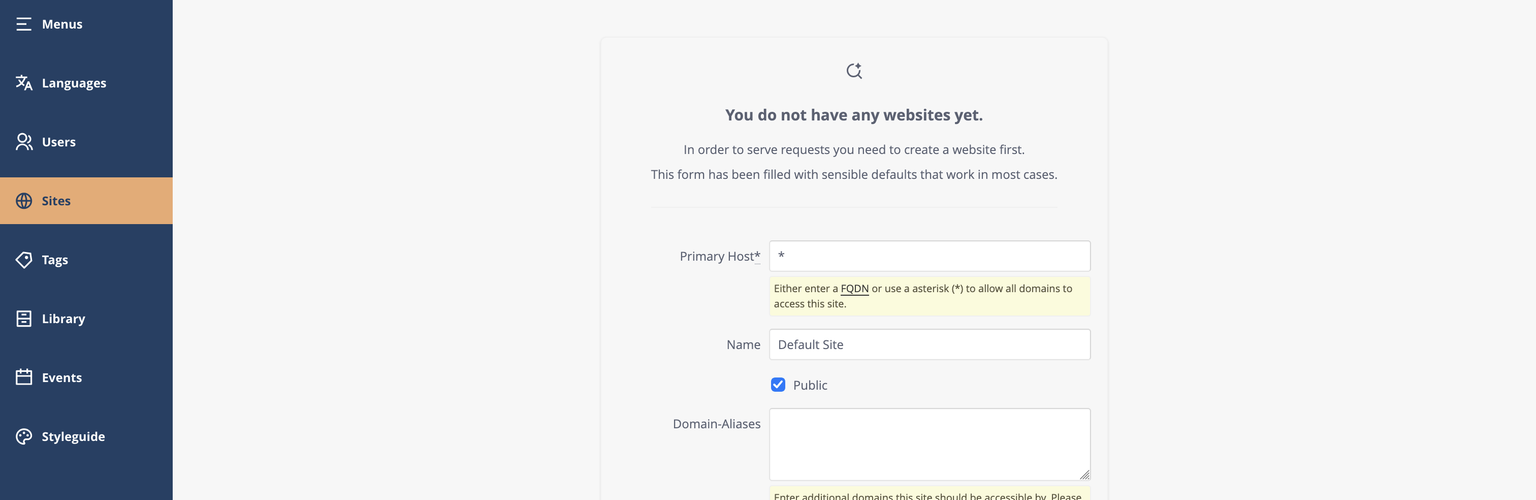
- New panel style and a new empty state.
- A help button in the admin
- Inline labels for primary actions, and form labels stacked above fields on small viewports
- A scrollable main navigation, which helps on small screens and with long menus
- Image file type shown in the picture info dialog
- An Alchemy News widget for the new dashboard introduced in 8.3
- A configurable preview load timeout
Security Hardening
This release comes with a broad round of security improvements, Here is a list of everything in one place.
Safer uploads
- Attachment uploads are restricted to an allowlist of file types by default. Only the file types you expect can be uploaded.
Protection against injection
- Executable URL schemes (like
javascript:) are rejected in nodes and ingredients. - Names in the remote select autocomplete highlight are escaped.
- Element preview text in the admin is rendered as plain text.
- Formulas are escaped in admin CSV exports, so exported data is safe to open in spreadsheet applications.
Content Security Policy for the admin
Alchemy can now send a Content Security Policy with admin responses. It’s an opt-in, so existing apps keep working as before. To make a strict policy possible we added nonces to inline script tags, render admin config data as JSON script tags, removed the inline script from the preview frame and moved most inline behavior into web components.
Hardened requests and access control
- Switching the admin language is now a POST request, as it changes state.
- Legacy URL Redirects only point to published pages.
- Scheduled records are only returned once their publication window has started.
- Restricted pages can now be limited to user roles other than
member.
Performance improvements
Cache Rules Everywhere Around Me
You can even better control cache per element and page layout now.
Element-level opt-out for page caching
Elements that must stay dynamic no longer force you to disable caching for the whole page. You can set cache-control headers on the element definition and only if an element of this type is used on that page it controls the page cache-control headers.
Cache-Control headers per page layout and element
Instead of just disabling or enabling the cache you can now pass a hash of cache-control headers to the page definition. Opting out of the cache now uses no-store to avoid caching completely.
The XML sitemap is now cached
The SEO XML Sitemap is now cached so crawlers do not hit your app anymore.
Faster Rendering
- Nested elements reuse the preloaded element set during rendering.
- The tag list is cached, which removes the N+1 query on tags.
More noteworthy improvements and bug fixes
- The new
alchemy-conditional-fieldweb component, contributed by @sascha-karnatz, shows or hides form fields depending on other fields. - Pages and Nodes are now relatable resources, building on the
RelatableResourceintroduced in 8.2. - Select filters accept multiple and include_blank as a Boolean or a Proc, contributed by @mamhoff.
Alchemy::Current.usergives you access to the current user.- More audio and video media types are supported for attachments.
- A new
Alchemy.lhelper localizes dates and times scoped to alchemy namespace. - The admin navigation is now configured through a typed menu configuration. The upgrader handles migration of
modules.yml - The
alchemy:thumbnailsRake task now support pre-generating thumbnails for ActiveStorage as well. - TinyMCE has been updated to 8.9.
- PostgreSQL 18 is now part of the test matrix
- Ransack 6 is supported.
- Picture ingredients respect their format setting and the
srcsetconfig now also supports a hash in order to generate different picture formats.
Breaking Changes
jQuery, rails-ujs and Select2 removed
Alchemy no longer ships or loads any of these in the admin. If you have custom admin JavaScript or extensions that rely on $/jQuery, Select2 or @rails/ujs (e.g. data-remote or data-method links), migrate them to plain JavaScript, web components and Turbo before upgrading. Custom elements should extend the native HTMLElement (as of 8.3, AlchemyHTMLElement is gone).
RemoteSelect replaced with Tom Select
RemoteSelect is now built on Tom Select.The former API is still available and works with tom-select, but If you have customized or extended it, please check your code.
Dragonfly is now an optional dependency
New apps have used ActiveStorage by default since 8.2. Alchemy itself no longer depends on the dragonfly gem. If your app still uses Dragonfly, add it to your Gemfile yourself.
The upgrader will detect if you are using the dragonfly adapter and add the gem for you.
Alchemy::UserMethods
The user model integration now lives in a new Alchemy::UserMethods module. alchemy-devise has been updated, but if you have your own User class, please include that module and run the alchemy:user_columns_migration generator.
Attachment uploads are restricted by default
Because uploads are now limited to an allowlist, file types you didn’t expect to matter may be rejected after upgrading. If your editors upload other file types, extend the allowlist.
Upgrading
Upgrading as always by bumping the gem version and running the upgrader, which will guide you throught the process.
# Gemfile
gem "alchemy_cms", "~> 8.4.0"
gem "alchemy-devise", "~> 8.4.0"
bundle update alchemy_cms alchemy-devise
bin/rails alchemy:upgrade
bin/rails g alchemy:devise:install --skip
Thank You
A huge thank you to all contributors who made this release possible — including first-time contributor @Dirk82. 🙏
All changes
For a full list of changes see the full changelog on GitHub.
Need help upgrading?
We are happy to help you and your team to keep your Alchemy and Rails app up to date.